Every Christmas, your wish list should contain two things. The first being the things you want, while the second being the things you need. We at The Real Mac Genius.com have gathered our genius minds together to find the best Holiday gifts to purchase will all the Holiday money. Like many geniuses, we couldn’t keep the number at 10, we had to better ourselves by going to our top 12 gift items. Pars Eme fapello

1.
Flashcard Touch
Who: The Students
What: This app is amazing. It allows you to create your own flashcards by hand, or by just entering in a term and automatically looking for a definition online. With this app, you can also get information off of Quizlet or another flashcard resource. Flashcard Touch will help the student in your life for their studying on the go
Price: $5
2.
MacBook Family
Who: The Adults and Students
What: Some of the most favored features of Apple are the clean design and user interface of their MacBook lineup. Literally anyone can use that, and use them well. Depending on the flavor of MacBook each is made for different types of use. Therefore, even the youngest student of most un-tech-savvy adult can use an Apple computer.
Price: Starts at around $1000.
 3. iPhones and iPads
Who: The Adults, Students, and Kids
What: Like the Apple Computers, these are also user friendly. But in this case, it is more than that. These devices allow you to do a large portion of your work on the go, be it using apps or answering email.
Price: iPhone starts at $199, iPad starts at $499
 4. iWork
Who: The Adults and Students
What: This is Apple’s version of Microsoft Office, but of course made differently. However, unlike Microsoft Office it is a lot easier to use. Replacing Word’s complicated options, is a simpler and quicker software solution allowing users to write anything from newspapers to reports. iWork contains the ability to make slideshows, and charts on top of their version of Word, Excel, and PowerPoint which have the similar improvements to them. Additionally, Apple has created a mobile version of iWork for your editing needs on the iPad.
Price: Starting at $79
 5. Dragon
Who: The Adults and Students
What: One of the best speech recognition software on the Mac software market. This means you talk into your computer and it automatically writes what you say with the free iPhone and iPad app. This is helpful when writing a long report or when you don’t have time to write anything, like while driving.
Price: Starting at $99.99
 6. Bower and Wilkins P5 Hi-Fi Headphones
Who: The Avid Music Listeners
What: Bower and Wilkins’ first mobile product, the P5 headphones. These headphones boast only the best materials creating beautiful headphones. Bower and Wilkins have incorporated their renown Hi-Fi sound into these headphones.
Price: Starting at $299
 7. Targus Velos Messenger Bag
Who: The Traveling Apple Users
What: A stylish, fun, bag features interchangeable color straps giving it a whole different look with different straps from Targus. The Velos Messenger easily protects up to a 15.4 inch laptop.
Price: Starts at: $74.99
 8. Flip Mino HD
Who: The Traveling Camera Man
What: A sleek pocket video camera meaning to capture those moments you’ll want to remember. The Flip Mino HD captures 720p video (2 hours on the 8 GB model). It also features a flip out USB arm to fit directly into either a PC or Mac.
Price: 8 GB model starts at $229 (Available in a variety of different flavors)
 9. Popular Science+ App
Who: The Geek
What: Enjoy the Popular Science Magazine on the go with the iPad app. Popular Science+ brings reading a magazine on the iPad in a new way with interactive photos and text taking full advantage of the beautiful iPad screen and multi-touch interface.
Price: $2.99 during December
 10. DODOcase for iPad
Who: The iPad user
What: The beautiful handmade DODOcase make in the heart of San Francisco brings the traditional moleskin cover with a crafted bamboo case to the modern day iPad. The DODOcase puts the iPad in incognito of peering eyes with the carefully crafted binding and colors. Keep your iPad away from your bookshelf!
Price: Starts at $59.95
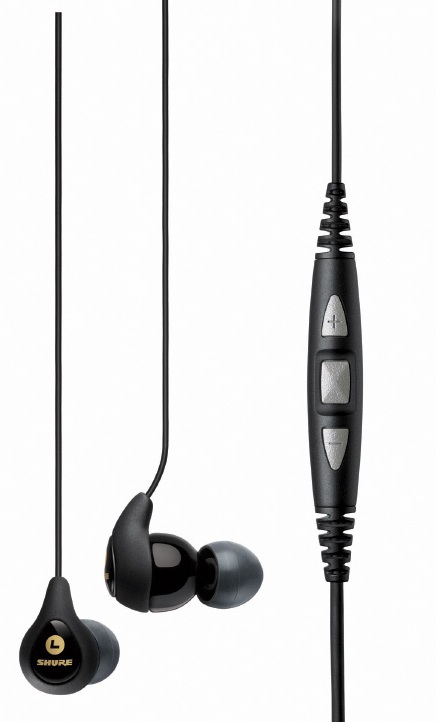
 11. Shure SE115m+
Who: The Music Enjoying Driver
What: Lightweight and compact headphones, the Shure 115m+ boast the Shure SE sound. The Shure 115m+ also include a three button remote located on the cable, allowing hands free calls, and less accidents!
Price: Starts at $119.95
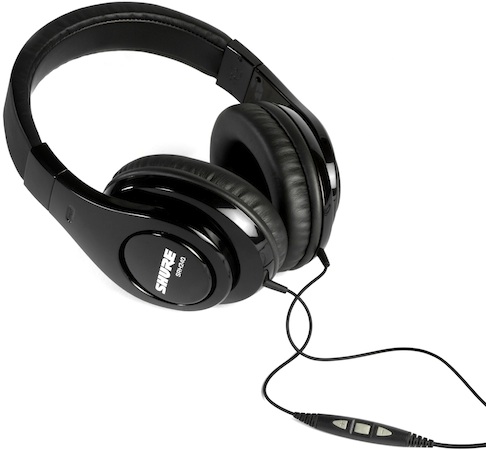
 12. Shure SRH240m+
Who: Over the ear lovers
What: A set of very comfortable Shure Over the ear headphones. This set has 40mm Neodymium drivers, as well as a three button remote. The Srh 240M+ are a great bargain for those iPhone users wanting to listen to quality music, and take calls.
Price: Starts at $79.95
Let us know, what did you wish for or what should we have added to the list?