Categories
Average Joe's Tips

What is Jailbreaking?

Defintion and History Cashsnoozy bbc

Jailbreaking is the form of “hacking” your iOS device to receive read/write (root or super user) access on the “locked” OS on your iPhone.

Jailbreaking started as a complex multi-step process shortly after the release of the first iPhone in the summer of 2007. It has been estimated that millions of iOS devices have been jailbroken. The jailbreak team is powered by the underground group of programmers and hackers called the iPhone Dev Team.

Major Programmers and Hackers

iPhone Dev Team — Hackers and programmers who are constantly finding security holes in Apple’s iOS. They have also greated GUI (Graphical User Interface) programs that exploit Apple’s iDevice.

George Hotz (Geohot) — The hardcore hardware hacker who unlocked the original iPhone. Geohotz also created purplera1n, blackra1n and limera1n that are considered to be the fastest way to jailbreak a iDevice.

Jay Freeman (Saurik) — Creator of Cydia, which is the most used “App Store alternative” bringing patches and modifications to Apple’s iOS.

Comex — Creator of the renowned Spirit jailbreak bringing an untethered jailbreak. Comex also created Jailbreakme.com which exploited through the devices Safari browser by a PDF exploit.

Why Jailbreak?

Until recently, Apple has started to implement most of the “patches” and “applications” that users sought after before the new versions of the iOS. Additionally, jailbreaking enables you to have more choices by giving you what I like to call the “Unofficial App Store”, Cydia. Cydia was the early beginnings of the App Store which allows you to download modifications for your iOS device that Apple doesn’t allow. For instance, for the longest time, the Google Voice app was rejected; however, after many changes to Apple’s iOS Developer Agreement, the stakes have changed. With a jailbroken device, your device can still connect to iTunes and the App Store, so it can take full advantages and get the “best of both worlds.”

Also, jailbreaking of the iOS device can also enable software unlocking of the SIM card, which allows the phone to accept any SIM without restriction. Unlocked iPhones are popular among users who travel to foreign countries because local SIMs have lower price per call than the international fees of your carrier.

What is Tethered verses Untethered Jailbreak?

A tethered jailbreak requires a computer connection to boot the jailbroken iOS device. Tethered jailbreaks are extremely frustrating because every time your iOS device reboots or the battery dies, you need to connect your device back to the computer to perform a “tethered” startup with the aid of a jailbreak application such as redsn0w.

An utethered jailbreak is most preferred because it does not require a jailbreak application to kick the iOS device out of impossible boot. So, if your iOS device reboots, you do not need to worry about having to connect back to your computer.

Overall, untethered jailbreaks are the best option if possible for your device.

Is it Legal or Illegal to Jailbreak?

“Yes it is both” would be the answer to if jailbreaking is legal or illegal. According to Apple, jailbreaking is illegal. Apple has announced that they believe jailbreaking is illegal and infringes on their copyrights through their complaint with the EEF (Electronic Frontier Foundation).

However, the EFF went to the side with the consumers and saying that “reverse engineering is a fair use when done for purposes of fostering interoperability with independently created software”

Steve Jobs has stated that the covering of loop holes from jailbreak developers is a “cat and mouse game.” The game consists of Apple and hackers trying to find security exploits within the OS.

What do you think of jailbreaking? Is your iOS device jailbroken? Drop a comment!

Categories
News

What can you make with your photos?

What is iPhoto? iPhoto is part of Apple’s  iLife ’11. iLife ’11 is a program for Mac that consists of iPhoto, iMovie, and GarageBand, but I am going to focus on iPhoto. With the new iPhoto ’11, you can do more with your pictures. iPhoto can be very convenient for organizing and managing your photos. iPhoto has three great features called the Faces, Places, and Events feature. The Faces feature sorts your library of pictures by detecting identical faces and sorts them by matching the pictures with the same person. The Places feature takes advantage of photos that are taken by a GPS-enabled camera and helps you figure out the location of the picture by using reverse geocoding to convert the location data. The Events feature also organizes your photos by the date they were taken, so you can easily distinguish between a photo taken from a year ago to a photo that was taken recently. iPhoto also gives you the opportunity to add special effects to the photos, such as making the photo black and white, antique looking, or make the photo brighter. iPhoto also helps you email your photos to your family and friends by automatically making it a special template design and you don’t even need to open Mail. You can also post photos directly to your Facebook Wall or photo album. If there are names on the photo from iPhoto, they will be converted to Facebook name tags automatically. Comments left on those photos will also show up on iPhoto. You can also share those photos on Flickr by clicking the Flickr button. If you have a MobileMe subscription, you can make an online gallery for your photos. The photos you have on iPhoto can also be synced onto your iPod, iPad, iPhone, and Apple TV to view them. You can also make amazing slide shows with iPhoto to entertain and dazzle friends and family with.

iPhoto comes with many different features, but what is really cool is that you can make print products through iPhoto. Have you ever wanted to make something really cool with your photos? Well now you can by using iPhoto! You can make beautiful books for everyone to look through. iPhoto books are very unique. When making an iPhoto book, a dynamic Theme browser helps you create the book. You select images and the Theme browser automatically organizes your photos into a book and the key photo becomes the cover. iPhoto books come in a variety of sizes. You can choose softcover, wire-bound, or hardcover.

With iPhoto you can also make pretty letterpress cards. There are many different occasions where you can give a letterpress card. You can make a letterpress cards customized by your photos and text. iPhoto letterpress cards are made from premium paper, come with matching envelopes, and have a special, unique look. You can also create 12 to 24 month calendars that are custom made to have photos and captions for certain days and you can even import your iCal events into your calendar. How awesome is that?

Last but not least, you can also print your photos. Those photos can be put in frames, put in photo albums, given to friends, and much more. The best part about iPhoto is that it gives you many different ways to view your photos and store your memories. iPhoto conveniently helps you make many different print products so you can look at your photos all the time and so can your friends and family. Do you like iPhoto? Leave a comment and tell me what you think.

[Image Source]

Categories
News

Cool! A Mac App Store!

If you ever had an iPad, iPod touch, or iPhone, you would know what the App Store is. Now there is going to be an App Store for Macs, called the Mac App Store. It is coming January 6, 2011. The Mac App Store is a basically a marketplace for various Mac apps. You can look at the Mac apps through different categories. You can also use the search box on the top right to quickly search for the app you are looking for. When looking at app, you can look at the developer description, user reviews, and screenshots. If you decide that you want the app, just click to buy it. The Mac App Store allows you to download and install apps easily. You just need to type in your iTunes password to purchase and download apps. The app you decide to download and install goes directly to your Dock. If you bought the app, you can easily download it on every Mac that you use so you don’t have to buy the app for each Mac you own. You can also update your apps one at a time or all at once. The Mac App Store always keeps track of your apps and will inform you when an update is available to keep your apps up to date.

Apple also has a program called the Mac Developer Program. It costs $99/year to enroll in the program that allows you to distribute Mac apps on the Mac App Store. The program also helps you develop your apps. Apple is confident that the Mac App Store will be just as successful as the iOS App Store. What do you think? Are you looking forward to the launch of the Mac App Store? Do you think it will be successful?

[Image Source]

Categories
Average Joe's Tips

How to: Record Your Screen with a Mac

Do you ever wonder how people on YouTube make videos of their screen with no camera? Well it is super easy and you will not have to buy any software. First, you have to open QuickTime Player and scroll up to “File.” Then select “New Screen Recording” and select the red button when you are ready to record. Also you can change settings like quality and where to save your video on the drop down menu located on the bottom left of the recording screen. camila araujo onlyfans leaked When you are done recording on the top right of the Menu Bar is a button that says “Stop Recording.” After that your new video should be saved in your “Movies” folder. This is a great and easy solution for screen recording when you want to show people how to do something on your computer. What do you think? Leave a comment below and let us know.

Categories
Uncategorized

The Real Mac Genius.com 2010 Best Holiday Gifts

Every Christmas, your wish list should contain two things. The first being the things you want, while the second being the things you need. We at The Real Mac Genius.com have gathered our genius minds together to find the best Holiday gifts to purchase will all the Holiday money. Like many geniuses, we couldn’t keep the number at 10, we had to better ourselves by going to our top 12 gift items. Pars Eme fapello

1. Flashcard Touch
Who: The Students
What: This app is amazing. It allows you to create your own flashcards by hand, or by just entering in a term and automatically looking for a definition online. With this app, you can also get information off of Quizlet or another flashcard resource. Flashcard Touch will help the student in your life for their studying on the go
Price: $5
2. MacBook Family
Who: The Adults and Students
What: Some of the most favored features of Apple are the clean design and user interface of their MacBook lineup. Literally anyone can use that, and use them well. Depending on the flavor of MacBook each is made for different types of use. Therefore, even the youngest student of most un-tech-savvy adult can use an Apple computer.
Price: Starts at around $1000.

3. iPhones and iPads
Who: The Adults, Students, and Kids
What: Like the Apple Computers, these are also user friendly. But in this case, it is more than that. These devices allow you to do a large portion of your work on the go, be it using apps or answering email.
Price: iPhone starts at $199, iPad starts at $499

4. iWork
Who: The Adults and Students
What: This is Apple’s version of Microsoft Office, but of course made differently. However, unlike Microsoft Office it is a lot easier to use. Replacing Word’s complicated options, is a simpler and quicker software solution allowing users to write anything from newspapers to reports. iWork contains the ability to make slideshows, and charts on top of their version of Word, Excel, and PowerPoint which have the similar improvements to them. Additionally, Apple has created a mobile version of iWork for your editing needs on the iPad.
Price: Starting at $79

5. Dragon
Who: The Adults and Students
What: One of the best speech recognition software on the Mac software market. This means you talk into your computer and it automatically writes what you say with the free iPhone and iPad app. This is helpful when writing a long report or when you don’t have time to write anything, like while driving.
Price: Starting at $99.99

6. Bower and Wilkins P5 Hi-Fi Headphones
Who: The Avid Music Listeners
What:  Bower and Wilkins’ first mobile product, the P5 headphones.  These headphones boast only the best materials creating beautiful headphones. Bower and Wilkins have incorporated their renown Hi-Fi sound into these headphones.
Price: Starting at $299

7. Targus Velos Messenger Bag
Who: The Traveling Apple Users
What: A stylish, fun, bag features interchangeable color straps giving it a whole different look with different straps from Targus. The Velos Messenger easily protects up to a 15.4 inch laptop.
Price: Starts at: $74.99

8. Flip Mino HD
Who: The Traveling Camera Man
What: A sleek pocket video camera meaning to capture those moments you’ll want to remember.  The Flip Mino HD captures 720p video (2 hours on the 8 GB model).  It also features a flip out USB arm to fit directly into either a PC or Mac.
Price: 8 GB model starts at $229 (Available in a variety of different flavors)

9. Popular Science+ App
Who: The Geek
What: Enjoy the Popular Science Magazine on the go with the iPad app. Popular Science+ brings reading a magazine on the iPad in a new way with interactive photos and text taking full advantage of the beautiful iPad screen and multi-touch interface.
Price: $2.99 during December

10. DODOcase for iPad
Who: The iPad user
What: The beautiful handmade  DODOcase make in the heart of San Francisco brings the traditional moleskin cover with a crafted bamboo case to the modern day iPad. The DODOcase puts the iPad in incognito of peering eyes with the carefully crafted binding and colors. Keep your iPad away from your bookshelf!
Price: Starts at $59.95

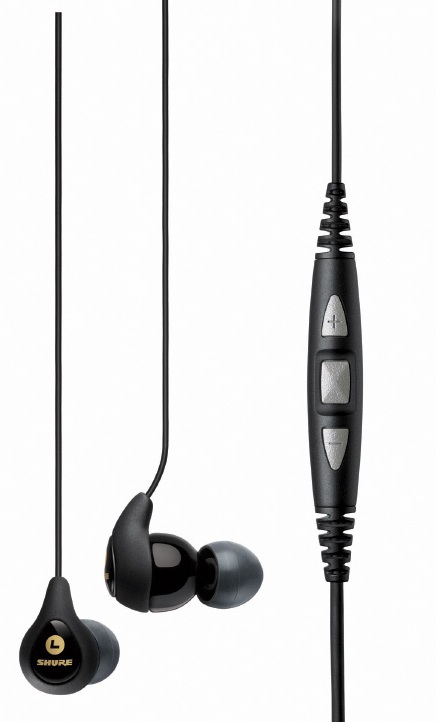
11. Shure SE115m+

Who: The Music Enjoying Driver
What: Lightweight and compact headphones, the Shure 115m+ boast the Shure SE sound.  The Shure 115m+ also include a three button remote located on the cable, allowing hands free calls, and less accidents!
Price: Starts at $119.95

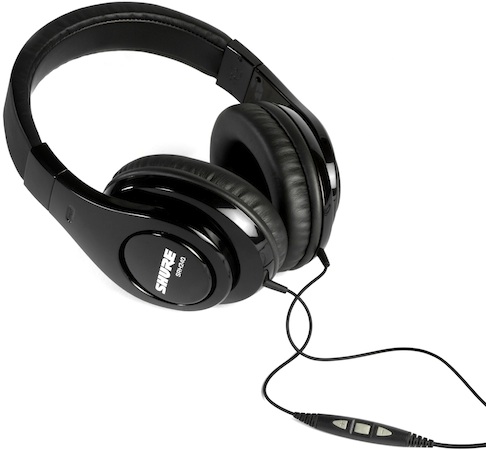
12. Shure SRH240m+
Who: Over the ear lovers
What: A set of very comfortable Shure Over the ear headphones.  This set has 40mm Neodymium drivers, as well as a three button remote.  The Srh 240M+ are a great bargain for those iPhone users wanting to listen to quality music, and take calls.
Price: Starts at $79.95

Let us know, what did you wish for or what should we have added to the list?