 Apple’s Mac App Store has been a hit and miss among the community of Mac users. Many users like having the Mac App Store because of its easy access to the software. Many users also liked having the software in CD form because they can share it among their family and friends. I personally like the Mac App Store because it’s easy to find apps, and even easier to install and update your app. Sometimes your app goes missing, all you have to do is go back into the Mac App Store, search up your app, and click install and your app will reappear again.
Yet, the Mac App Store has more room for improvement among many other things. I would like to see Apple be able to transfer the CD form of an app and automatically enter it into the Mac App Store. Before the Mac App Store was available, everybody had to buy the CD form of the software. If Apple would allow grandfathered Apple apps, it would eliminate the confusion of updating Apple’s apps. When the Mac App store originally opened, Apple actually let disc-installed Apple apps to be installed and put into the Mac App Store and be marked as installed. Unfortunately this feature doesn’t work anymore; hopefully Apple gets back to that. sex rough Kirstybunny
Unfortunately on the Mac App Store, users are limited to viewing their Apps from recent to oldest. In the Mac App Store there is a “Purchases” button. When you click that button, you see the lists of Apps you bought from recent to oldest. Apple should allow the user to find their apps in alphabetical, price, and so forth. The Mac App Store only lets full-fledged applications to be put onto the Mac App Store. Apple should loosen up and allot screensavers and widgets on the Mac App Store. They don’t present the same risks as some third-party owners. Some users like to scroll through screensavers and actually buy them. That would put an interesting twist into the Mac App Store.
Apple will certainly change the Mac App Store into a cooler store. The Mac App Store is almost new, so Apple is still trying to fix the store. We just have to be patient and hope that Apple listens to us. Have any questions? Leave a comment and we will get back to you as soon as we can.

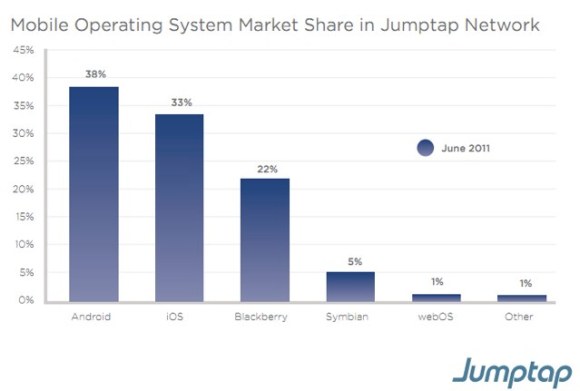 Based on Jumptap, a mobile ad network, Android is dominating the U.S. If you look at the July 2011 Mobile STAT, Android is leading with 38% of the market share in Jumptap Network. bryce adams sex tape dillpickle785 iOS is second place with 33% market share. Blackberry OS is third palce with 22% market share. Competitors such as Symbian and webOS have very little control over market share.


![[Image Source 1]](http://tctechcrunch2011.files.wordpress.com/2011/08/jumptap-os-market-share.jpg?w=640)
![[Image Source 2]](http://tctechcrunch2011.files.wordpress.com/2011/08/jumptap-mobile-ctr.jpg?w=640)
![[Image Source 3]](http://images.macrumors.com/article-new/2011/08/jumptap-os-map-500x274.jpg)