Categories
News

iPad 2 Lines Still Crowded After Launch!

It has been more than a week since the launch of the iPad 2, and it is still difficult to get one. People have been lining up outside Apple retail stores every morning. Apple retail stores only receive shipments on certain days also, but they will not disclose the days it will receive a shipment. You have to go every morning just to check if they even have a shipment that day. Even if they do have a shipment, they only receive a small quantity. If you decide to buy it online, it now estimates that it will ship in 4-5 weeks, which is a very long time for those who are anxious to get there hands on one. On a positive note, if you buy it online at the Apple Online Store, you get free shipping and free iPad engraving, an Apple Online Store exclusive offer.

Apple Stores are now holding iPad 2 shipments that were received during the day, instead of selling them once they arrive, so they can sell it the next morning so people won’t crowd the store all day hoping a shipment will arrive to sell throughout the day. Some Apple Stores are even opening earlier just to sell the iPad 2 and get rid of the crowd so it will be less crowded for the normal business hours.

In my opinion, your best bet is to still purchase your iPad 2 online at the Apple Online Store. You get free shipping and the free iPad engraving is an awesome offer. You can your very own iPad 2 customized with your very own engraving. On the other side, I would also want to get my iPad 2 right away. It would also be a good idea to go to the Apple Store early in the morning and wait in line. Some people are even camping out, so there is a lot of competition for getting an iPad 2. Just make sure you are prepared for the weather. The iPad 2 is definitely in demand, and I hope they come out with more frequent and larger shipments because we are all waiting for one.

Feel free to leave comments and questions.

[Image Source]

Categories
Average Joe's Tips

Part Three Traveling with the iPad: Economical Accessories

As promised I am going to give you five economical travel accessories for the iPad. These accessories are less expensive, but do not have the same quality put into them as the products in the previous article. Not to say that they are not good because they are great products.

The first item is a case and I have selected the Incase Origami Sleeve. This is a great product because it is protective of the iPad and you can fold the sleeve up to make a stand for your iPad! This catch will only cost you $35. The next item up to replace the Tumi bag is the Golla G366 backpack. This backpack has many pockets perfect for fitting anything you want a a very protective spot to put a computer or iPad for only $90. Up next is the PortaPro by Koss. Like it’s name it is very portable and easy to carry making this perfect for international travel for $50. Very nice and reasonably priced is the iPad Keyboard Dock by Apple for $73. At first glance the Kensington adapter looks like the Tumi Adapter but no its about $30 less and its still great. This is clearly a great choice in these hard economical times to replace more expensive items.

Stay connected at my new twitter handle to stay updated 24/7 @TRMGaveragejoes and @realmacgenius

What do you think? Let us know in the comment section.

Categories
Uncategorized

Update 3/21/11 iPad 2 Shortage, AT&T + T-Mobile, AT&T Tethering Warnings

Learn about the iPad 2 shortages around the US and delayed launches around the world, AT&T’s acquisition of T-Mobile, and AT&T warning iPhone customers using unwarranted tethering applications and plans.

Do you need to run windows applications on your Mac? CrossOver, by CodeWeavers can help! Learn more about how to use CrossOver and CrossOver Games to run windows applications on your Mac . No need to reboot, no need for a virtual machine AND no need for a window’s license!


Categories
Average Joe's Tips News

How to: Enable iPad Orientation Lock Switch 4.3


What if one of the most anticipated features for the iPad 2 was a small switch? The small switch is on the new iOS 4.3 which re-enables the iPad orientation lock switch, which was temporarily turned into a mute switch in a previous iOS update. In the newest iPad update, it now lets you choose whether to have the side switch function as a rotation lock or as a mute button. Here are the steps to switch between the rotation lock and mute.


  • Tap on “Settings”
  • Scroll to and tap on “General”
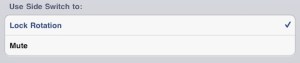
  • Scroll down and look for “Use Side Switch to:” and tap on “Lock Rotation”
  • Exit settings by clicking the home button and you are done


In this picture, you can tell that we have switched the rotation lock on instead of the mute button:


If you’re wondering to why anybody would care about this, here’s some background information. Apple changed the rotation lock to be a software feature in the previous iOS. This caused the mute button to turn into the side switch. Many people were actually mad at this because it use to be very convenient to just turn the lock on without any hassle. Apple listened to the people and gave us the choice to turn the side switch into a rotation lock or mute button. How nice of Apple to make this change, if you think this is useful, let us know. Drop a comment and tell us if this affects you or if you think this matters at all.


Categories
News

iPad 2 Zooms by the Motorola Xoom

How fast is the iPad 2? How about adding a dual core A5 chip and 9 times the graphic speed. When you’re flipping through your pages on the home screen, you will notice the changes. The faster graphics make games smoother and more realistic. Certain games with video will show a smoother transition and not as sluggish you could say. The A5 dual core will do two times the work at once. While your multitasking to get to your applications faster or watching a movie, your whole iPad will seem like it’s hyped up on steroids. Everything just works faster and better with dual core. The new iPad two went face to face with the Motorola Xoom, and let’s just say it wasn’t a fair battle.


The iPad 2 and Xoom both share a dual core chip, but nothing can compete with the A5 chip, especially the Android powered chip. Our friends at AnandTech ran some benchmark speed tests, and it completely tore the Xoom apart. The iPad 2 beat the Xoom by almost 3.7 times faster. It also topped the original iPad by 5.4 times faster by framerate. With the faster speed of the new iPad 2, the developers will be able to create better apps that offer better graphics and faster performance. I think that the Xoom will never be as fast as the iPad because of who it’s built by. Apple’s A5 chip is the new best thing, but this certain chip will always be fast and will tear apart the competition.


The new iPad 2 is a different type of tablet and also has new technology then the original iPad has. It comes with the dual core A5 chip and 9 times the graphic speed which I talked about before. It kept the same 10 hour battery life which to me is astonishing considering the fact that the iPad is technically doing twice the work then the original iPad. The new iPad 2 also has the three-axis gyroscope which is really cool. You get to see apps in a different way, and it may also seem like it’s more realistic. The iPad 2 has the new Smart Covers which make the iPad look more colorful. The Smart Covers are a magnetic attraction for the iPad 2. The iPad 2 it self has built in magnets that align perfectly with the Smart Covers. The Smart Cover can fold backwards so that you can turn it into a keyboard stand or a FaceTime/video stand. The Smart Cover comes in two textures, Polyurethane and Leather.