
Want to know what the new campus for Apple looks like? Well look no further, the Cupertino city homepage has posted Apple’s proposal in full detail. maliarain alabama barker nude It includes high-res drawings and pictures, renderings, floor plans, and conceptual landscapes. From an aerial view, it looks circular:

From the drawing, it looks very open and there are many trees around it. From a picture above, the area has many buildings already there. It seems like Apple is going to knock out all of the buildings and replace it with trees. Apple plans to have a main building, a research building, parking structure, corporate fitness center, a corporate auditorium, and a courtyard that could expand:

The building looks like it will have three floors, but in the high-res photo it shows four. So predict about 3-4 floors which will be nice either way. The main building is almost all glass excluding the posts that have to hold the building up. It is a very nice open building that will have a sunny view anywhere you are walking inside the building. Here’s a look:


I think that the new building will be a great thing for Apple. The building is bigger and it is a very nice layout. Especially the way Apple works, it will be a great use for all the space that are given. How big the campus is, is unavailable until the whole layout is complete. Expanding is the only way Apple will grow as a company and a bigger campus will only boost Apple’s reputation.
 Based on the IDC, Apple is the top worldwide smartphone vendor with approximately 20.3 million units sold. Samsung, selling an estimated 17.3 million units, came in second place. Following behind Samsung is Nokia, Research in Motion, and HTC. The most eye-catching part of the quarterly report is the year to year growth. Compared to other smartphones, Samsung has the largest year to year growth of 380.6%. Apple’s year to year change in sales grew 141%. The reason of Samsung’s increasing popularity compared to Apple is that Apple only sells just the iPhone, while Samsung sells different smartphone models. Apple’s iPhone has iOS, while Samsung’s smartphones has Android, Bada, or Windows Phone 7. It appears that Apple and Samsung are going to continue to be tough competitors for the top spot.
 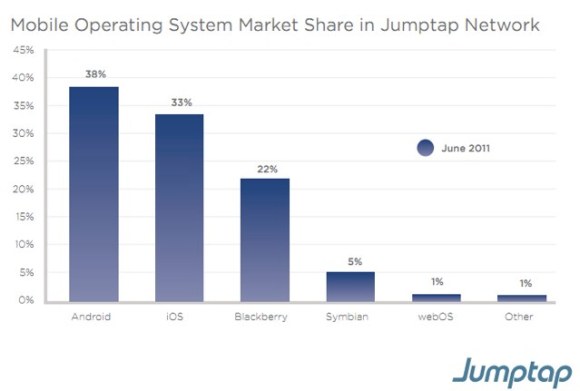 Based on Jumptap, a mobile ad network, Android is dominating the U.S. If you look at the July 2011 Mobile STAT, Android is leading with 38% of the market share in Jumptap Network.


![[Image Source]](http://gigaom2.files.wordpress.com/2011/08/idcq2smartphonesales.jpg?w=604&h=237)
![[Image Source 1]](http://tctechcrunch2011.files.wordpress.com/2011/08/jumptap-os-market-share.jpg?w=640)
![[Image Source 2]](http://tctechcrunch2011.files.wordpress.com/2011/08/jumptap-mobile-ctr.jpg?w=640)
![[Image Source 3]](http://images.macrumors.com/article-new/2011/08/jumptap-os-map-500x274.jpg)